
10-second summary:
- Get your business in front of potential customers at the exact moment they’re expressing interest in your services – or properties in your area.
- Google ads are a highly accountable form of advertising as you only pay when someone clicks your ad.
- Google treats property investment as a type of financial service. As such you may need to complete a simple verification process before publishing your ads.
- Ringfence the geographic locations in which you want your ads to display.
- Use Google’s free keyword planner to help identify the search terms people use to find services and properties that you provide.
It’s possible to transform your revenue with Google Ads for real estate leads. You just need to know how to set up for success. Here’s a guide.
Every day, millions of people use Google to search for real estate investment opportunities. With Google Ads, you can make sure you capture search intent and generate a reliable flow of fresh leads for your business.
1,400% increase in leads?
One quick thing before we start. We specialise in real estate lead generation – orchestrating Google Ads that get BIG results. Ours is a floor-to-ceiling approach that generates vast returns for our clients.
Allow us to do the same for you. Ask for a free proposal and we will outline what you can expect within three months of working with us. We may even be able to cover your ad spend.
Since working with Adbetter, our digital paid media channels have grown to be one of our most consistent generators of high-quality leads. Our lead volumes from paid media channels have increased over 1,400% whilst maintaining a low cost per lead.
Matthew Fawl, Director, Alesco Investment Property
An introduction to Google Ads for real estate leads
If you’ve ever searched Google – and we know you have – you’ll be familiar with the sponsored listings at the top of the search results. They’re Google Ads. And they are great for driving new leads towards your business.
As well as search, Google Ads encompasses the Google Display Network – which gives you the ability to advertise across a vast estate of websites, mobile apps and more.
>> Getting results from Google display ads for lead generation
However, for this guide we will focus on search. That’s where the big opportunities are for real estate businesses.
Why do we love Google Ads for real estate leads?
In short: when you get Google Ads right, it’s an open door to enhanced profits. Here are three reasons why it’s great for real estate businesses.
- It’s accountable. With Google Ads you only pay when someone clicks your ad. And why would someone click unless they were at least partially interested in your services?
- It captures intent. You can use Google Ads to capture leads at the precise moment they are searching for the expertise and investment opportunities that you provide.
- It’s easy to control your spend. Expect options to automate daily, weekly, monthly or maximum budgets per campaign. You can hit the pause button at any time. And every penny is accounted for in the performance data.
Google isn’t the only option
Google Ads can be spectacularly effective. But it’s not the only option for driving real estate leads through pay per click advertising.
Here are some other articles you may want to bookmark.
>> Facebook ads for real estate: tips for growing revenue
>> How to boost revenue with Instagram ads for real estate
>> YouTube ads for real estate: a guide to getting results
>> Display ads for real estate: a short guide for success
>> TikTok ads for real estate: should you bother?
How do Google Ads for real estate work?
The Google Ads interface is slick and easy to use. You don’t need any coding expertise. And it is possible to get results with no prior experience with either Google Ads or advertising in general. Especially if you read this guide.
However, an important regulatory note.
Google sees property investment as a type of financial service. In order to show your ads in the UK to people searching for terms like “property investment”, you may need to complete a verification process – which includes demonstrating that you are authorised by the Financial Conduct Authority (FCA).
However, instead of going through that authorisation process yourself, you can partner with a company who is already approved by the FCA – such as a mortgage broker – who can approve you as a 3rd party.
Okay, let’s get moving.
Setting up your Ad campaign
Create an account
Let’s start with the basics. To create Google Ads, you need to set up an account. Head to ads.google.com to sign up. Your Google Ads account is where you will control billing, admin permissions and, of course, your ad campaigns.
Campaigns and ad groups
Each campaign can be broken into different ad groups, where you’ll set your budget and targeting. Each ad group will have a different set of keywords that you can use to focus on a specific part of your business – with your ads triggered when someone searches for keywords that you have specified.
Think about target locations and niches
Once your account is up and running, take some time to think about the areas of your business that you want to promote and the type of people you are advertising to.
Is your ideal client looking in a certain area? Do you specialise in a certain type of property – such as sea view locations? Or are you focused on certain investment opportunities such as student halls?
Create a list of neighbourhoods and niches that you’d like to target. These will eventually make up your campaigns and ad groups.
>> Facebook ads for luxury real estate: 4 big learnings
Keyword research – and the need to consider intent
Next it’s time to think about the keywords that you want to target. This is largely a game of putting yourself in your potential client’s shoes and thinking about what they might search for to find the sort of investment opportunities that you are promoting.
Google’s free keyword planner can help you narrow your focus. This will also give you ideas of the search volume, competition and potential cost for the keywords within various segments you might want to pursue.
Ah yes, cost. Promoting real estate through Google Ads isn’t a cheap advertising strategy. Given the potentially lucrative returns, the top keywords can be expensive. That’s because you can target search terms that show high buying intent, taking you closer to people who are demonstrably interested in the expertise and opportunities that your business provides.
That means your spend has to work hard to secure leads. So when you are considering keywords, think about the intent behind each search.
For example, “BTL investment in Manchester” suggests that someone is highly interested in property investment – and could benefit from your services. Whereas something more mundane such as “stamp duty rules” suggests low purchase intent.
Make sure your bids are in line with purchase intent – and be willing to pay more for high intent keywords.
Creating a Google Ads for real estate campaign
From your Google Ads account, click the blue plus sign to start creating your campaign.
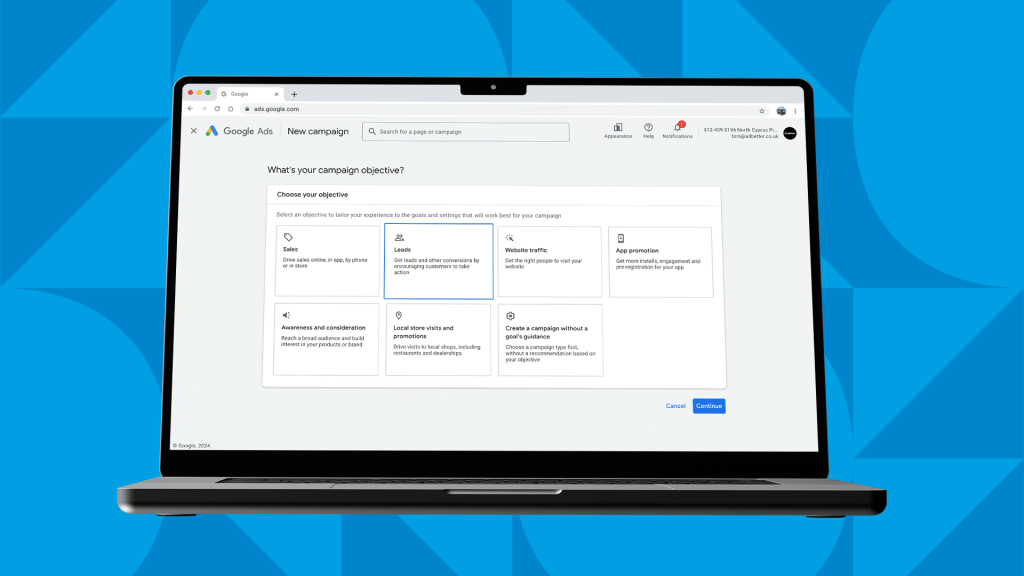
Set your campaign objective
The first thing you’ll do is choose a campaign objective. For lead generation – surprise, surprise – we’d recommend the leads objective. Here’s a quick summary of each objective.
- Sales: Focuses on increasing the sales and profitability of your products or services. Bidding strategies are aimed at clicks, assets and ads that prompt purchases.
- Leads: Aims to drive leads for your business by capturing customer information through form submissions.
- Website traffic: Emphasises driving traffic to your website.
- App promotion: Specifically designed for creating a streamlined journey to encourage installs of a mobile app.
- Awareness and consideration: This is aimed at boosting the visibility and recognition of your brand.
- Local store visits and promotions: Designed to drive footfall to bricks-and-mortar locations.
Set your campaign type
Choose a Search campaign – we want your ads appearing in the world’s most famous search engine.
Choose (and exclude) locations
Investment opportunities tend to be location agnostic. But if there is a particular city that you want to target – perhaps people local to a big new development that you are offering investments in – then you can specify that with your location targeting.
You can also exclude locations where you definitely don’t want your ad to be displayed.

Creating your campaigns and ad groups
Remember what we were saying earlier about considering the different niches that you want to promote? Your campaigns & ad groups are where you will segregate them. For example, you might have different campaigns for different locations and/or ad groups for different investment opportunities.
Specify your keywords
Next it’s time to list the keywords that you want your ads showing up for. You’ll find this easy because you did your keyword research when we mentioned it earlier, right?
Some example keywords:
- Manchester property investment
- Property investment in Manchester
- BTL properties in Manchester
- Student accommodation investment
Understanding keyword match types
Google lets you define how tightly it matches your keywords. For example, you can set it to display your ad for keywords that are loosely related to yours. Or you can insist that your ad is only served when your exact keywords are searched for.
- Broad match: Your ad will be displayed for all keywords that are similar to the ones you specified. This is the default setting.
- Phrase match: Your ads are shown in search queries that contain the exact phrase or a close variation.
- Exact match: Your ads will only be served when someone searches your exact keywords, with no additional words.
There’s no right or wrong answer here – and increasingly it’s not an exact science as Google changes how match types work. It all depends on the keywords you have chosen and the search volumes your keywords attract.
Exact match allows you to be more targeted. Whereas broad match can enhance your exposure – although potentially serves your ad to people with less interest in your services.
It’s a balancing act. Experiment and be led by your data.
What about negative keywords?
Just as you can define keywords that you want your ad to be shown for, you can define keywords that block your ad from being shown.
Why would you want to do this? Let’s say you have an ad based on the keyword “BTL property in Manchester”. You’ll want to make sure people searching for “BTL property data in Manchester” are excluded from seeing your ad. This suggests a more research-focused, journalistic intent.
Specifying “data” as a negative keyword reduces the chances of you paying for a click that won’t create new business. Think carefully about other words you can exclude to weed out the searchers with low intent.
Creating your first ad
Now it’s time to start actually creating your ads: writing the copy and firing it out into the world.
Where are you sending your leads?
To start with, you need to provide a URL that your ad will drive traffic to. This should be a landing page that’s specific to your ad group. More on that shortly.
You will also be prompted for a display path. This is simply the way you want your URL to look in your ad.
For instance, your final URL might be something like:
http://www.mega-properties.com/landing-pages/manchester/btl-investments
But you could style it as:
mega-properties.com/btl-manchester
Much neater.
Crafting your headlines and descriptions
Okay, it’s time for some penmanship.
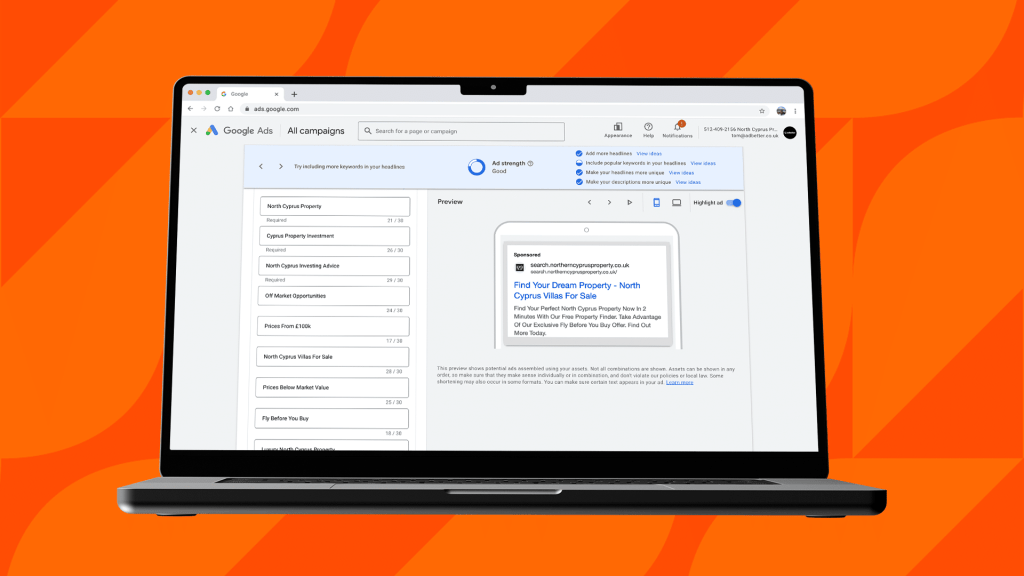
Google Ads comprise one to three headlines and one to two descriptions.
- 1-3x headline (30 characters)
- 1-2x descriptions (90 characters each)
One important thing to note is that Google ultimately creates your the copy combinations in your ads for you. You feed it variations of headlines and descriptions – and it finds the best combinations for driving leads to your business.
Here are some tips for attention-grabbing ad copy.
Remember your reader
Remember there’s a real person behind every search. Speak directly to your lead using “you”-focused messaging. Think about what this person might be feeling.
What are their ambitions for property investment? What outcome are they looking for? What barriers to conversion do they have? What are they apprehensive of?
Try to get inside their head and write accordingly.
Include your keywords in your copy
It’s a good idea to use the keywords you are targeting in your campaign, which will be emboldened in your ad copy. This increases your ad relevance which can lower you cost per click (CPC).
Make it measurable
If you have any quantifiable successes that are relevant to your ad, by all means include them. Data can make it easier for people to realise the potential benefits of working with you.
That doesn’t have to be anything to do with returns – in fact you should steer clear of mentioning potential returns to escape a regulatory wrap on the knuckles. But it could be as simple as: “Hundreds of BTL investment opportunities in Manchester.”
Use pinned placements
You can influence the prominence with which Google will display certain headlines or descriptions by pinning them in position one, two, three and so on.
Communicate with clarity
You have milliseconds to get your message across. Be clear. Stay relevant to your keywords. Write with brevity.
Should you use assets?
Assets are pieces of additional information that can be included in your ad. We’d advise steering clear of additional site links to your website. You want your ad to have a singular focus – driving all clicks through to your landing page.
However, you may want to take the option to include your phone number – which people can click straight from the Google search results to call you. You can also include the locations of your offices if it’s relevant to the region you are targeting.
Beyond the click: optimising your landing pages
When you’re paying for every click, it’s worth thinking carefully about what happens next.
Landing page best practice
You should have a specific landing page that’s highly relevant to each of your ad groups. Landing page design is a huge subject in its own right. But here are some quick tips.
- Design and copywriting. Your landing page should feel like a continuation of the ad your visitor clicked. Your design should be optimised for mobile and feature a compelling proposition above the fold.
- Create a closed journey. Single-mindedness is a strength when it comes to landing pages. Limit navigation options and stay focused on one clear call to action.
- Gather data. The main aim of a landing page is to gather information on your lead. Create a form that allows you to start the marketing conversation. More on this shortly.
- Remember your GDPR obligations. For your forms that means having a tick box that gets people to actively opt in to your comms. Be clear about who will be contacting your lead and how they will be contacted. You must also provide a link to your privacy policy.
- Utilise social proof and trust signals. Testimonials from previous patients will go a long way to helping build credibility and trust in your company. If applicable, utilise trust signals such as industry accreditations, qualifications or awards.
Create a lead magnet
To repeat: the main objective of your landing page is to gather data on your leads. You can incentivise form completion with some sort of giveaway.
That could be a guide to property investment. A portfolio of your current investment opportunities. Or perhaps even a free consultation
Screen your audience
It’s usually better to have a small number of leads with high conversion intent than a bunch of leads who are never going to become customers. And even though you’ve already paid for the click, you can design your lead generation form in a way that screens out people who are unlikely to convert.
For example, let’s say you only want to attract potential customers with a high budget. One of your form questions could be “What’s your investment budget?” – with the available answers starting from £350,000 and increasing in £50,000 increments. This signals to people with a budget lower than £350,000 that your services may not be right for them.
Obviously this increases your cost per lead (you’ve already paid for the person to click to your landing page). But it can leave you with a highly targeted group of people – with high conversion intent – to reach out to.
Setting your campaign budget
The final step in creating your campaign is to set a campaign budget. There is lots of freedom to experiment here. You can set daily or weekly budgets, set rules around seasonality and change your settings anytime within a matter of clicks.
Here are the main bidding strategies to be aware of.
- Maximise clicks: Google will aim to bring you the most clicks possible for your daily budget.
- Maximise conversions: Google will aim to get the most conversions possible for your daily budget.
- Target CPA (cost per acquisition): Like the above, but Google tries to get as many conversions as possible within CPA parameters that you set.

Tracking and optimisation
Your ability to monitor – and interpret – your performance data can be the difference between success and failure. You should constantly look for what’s working – and what isn’t – so you can iterate your campaigns and drive increased performance and efficiency over time.
Set up conversion tracking
You need to tell Google what represents conversion for your campaign. Under “Tools and Settings,” go to “Conversions” to create a new conversion action.
This will often be measured when a visitor fills out a contact form or signs up on your website, but you can also measure calls.
UPDATE: Google has updated its conversion tracking and you need to know about it. Read our article on journey-aware bidding…
>> Journey-aware bidding: optimise Google Ads for actual revenue, not just leads
Continually monitor metrics

Your ads dashboard will provide you with lots of data on how your ads are performing. Many businesses pay only cursory attention to it.
But this data holds the secrets that will help you crack the code of campaign performance.
Is there something you are saying in your messaging that is encouraging clicks? Is one location dramatically outperforming another?
When you know what’s getting results, you can double down on those tactics – creating more ad variants based on what’s working and ditching the stuff that isn’t. Test, repeat, test, repeat. You should see your ad performance improving.
Review campaign search terms
Regularly review the search terms that trigger your ads to show up. This insight helps you refine your keyword and negative keyword lists so that your ads only appear for the most relevant and potentially lucrative queries.
Nurture your leads
Getting a lead is one thing. Turning that lead into a client is quite another. Make sure you have a process in place for nurturing your leads – whether that’s via email, phone calls or retargeting your real estate leads on other PPC channels.
Let us take care of it for you
If you’ve made it this far, we salute you. As you can see, there’s a lot to think about when it comes to creating successful Google Ads for real estate leads. It takes time. Tenacity. And no slim degree of experience.
That’s why you should consider working with an expert if you are serious about driving revenue.
Unlocking the big, big numbers requires knowing exactly what tactics to use and what levers to pull to maximise your campaign performance.
Here’s how we do it for our property clients day in, day out. Read some case studies here. Or ask us for a free proposal and we will lay out what you can expect within three months of working with us. There’s no obligation. If you choose to walk away after that the choice is yours – and you lose nothing. Let’s get started.
Rather go it alone? You need Nerchr. This is the software we built ourselves to drive ROI for our client campaigns and manage over £10 million worth of pay per click ad spend. Now we’ve made Nerchr available to everyone. Go get it.
You might also be interested in:
>> 8 tips to nail real estate lead generation
>> The best lead generation strategy for real estate businesses
>> Revenue-boosting PPC for real estate investors
>> Best practices for Google pay per click real estate campaigns
>> How to get more real estate leads – for new agents
>> Facebook ads for real estate: tips for growing revenue
>> Why you should use Facebook ads for commercial real estate
>> Facebook dynamic ads for real estate
>> How to boost revenue with Instagram ads for real estate
>> 6 expert tips for real estate retargeting ads