Underappreciated, underutilised and frequently misunderstood: many brands are missing opportunities with Google display ads for lead generation.
Mention Google ads and most people will automatically think of those precious areas of real estate at the top of the search engine results pages (SERPs). But the Google ads ecosystem extends way further. And represents something of an untapped resource for many brands hoping to generate leads.
This article reveals how you can drive positive returns from Google display ads if you’re in the business of generating leads.
One quick thing before we start…
Don’t worry. The great thing about pay per click advertising is that you can generate positive ROI with very little experience. But to get the really transformative results? That takes an expert. Ask us for a free proposal and we will outline exactly how we can help you skyrocket your pay per click returns with a service that pays for itself – and more. No strings attached. No obligation to work with us. Nothing to lose. Sound okay? Let’s get started.
“Since working with Adbetter, our digital paid media channels have grown to be one of our most consistent generators of high-quality leads. Our lead volumes from paid media channels have increased over 1,400% whilst maintaining a low cost per lead.”
– Matthew Fawl, Director, Alesco Investment Property
Google display ads for lead generation: the opportunity
There are many reasons why Google display ads for lead generation may be suited to driving new business for your brand. But here are two of the most important.
Reach a lot of people
The Google Display Network gives you access to about 90% of the websites on the www as well as YouTube and countless apps. It’s an easy, fast and affordable way to get your brand in front of a lot of people quickly – if scale is what you’re looking for.
Reach the right people
Of course, it’s not all about scale. The Google Display Network gives you the same powerful audience targeting options that you get with search advertising. Target audiences based on their hobbies, interests, education level, occupation, browsing activity, marital status and an awful lot more. You can even set your display ads to be served only to people who have searched for certain keywords. So it’s easier to find people who are likely to be interested in your products or services.
Setting up Google display ads for lead generation
Assuming you already have a Google ads account, you can launch a new display ad campaign in six simple steps.
1. Getting started
Hit the campaigns icon and select ‘New campaign’. Choose a goal – such as leads, sales, website traffic or something else. Select ‘Display’ as the campaign type and ‘Standard display campaign’ as the campaign subtype. Provide a URL for the campaign to direct to and enter a name for your campaign.
2. Choose your campaign settings
Choose the locations and languages in which you want your ads to appear. You can also select how often your ads will appear to the same customer, opt out of showing your ads on content that doesn’t fit your brand, set start and end dates for your campaign and more.
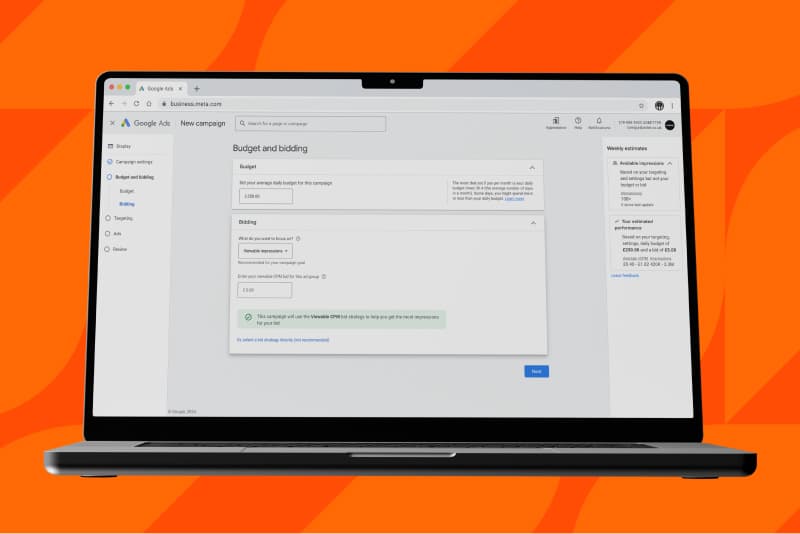
3. Set your budget and bidding strategy
Your budget influences how often your ads are displayed, while your bidding strategy determines the way that your budget is spent. Your bidding strategy will be preselected based on your campaign goal – but you can amend it if you wish. Display campaigns support automated and Smart Bidding strategies that can manage your bids for you and help you meet performance goals.
4. Choose your targeting strategy
Display campaigns allow you to choose the extent to which you control audience targeting. You can:
- Let Google Ads choose audience segments for you with optimised targeting.
- Add your own additional criteria to Google’s optimised targeting.
- Turn off optimised targeting and choose targeting signals that you think make the most sense for your campaign.
5. Add your assets
This is point at which you upload your assets: the actual images that will be shown across the Google Display Network. More on this shortly.

6. Review and publish
On the ‘Review’ page, you’ll have the opportunity to review all of your setting selections and uploaded assets. Once you’re happy, hit publish and your campaign will be sent for review.
Google display ads for lead generation: 4 tips for best practice
There are many nuances and variables to consider when creating a winning display ad campaign. But here are four of the top things to have on your radar.
1. Utilise lookalike audiences
Beyond the audience targeting options we’ve discussed, you can use data on your existing to customers to help Google find your next customers. Upload your first-party customer data as a seed audience and Google will find a fresh audience that shares key characteristics with your existing customers.
2. Choose responsive creative
When it comes to uploading your creative, you have two options.
A. Work up a load of ad variants yourself to fit the different ad resolutions used across the Google Display Network.
B. Use responsive display ads to upload a selection of assets and let Google create ad combinations for you that work across the entire display network.
If you want total control over how your ads are displayed, go for option one. But beware you will be limited to placements for which you have ads at the right size/resolution.
If you want breadth of access to the display network, go for option two. But beware that you will lose full agency on how your ads are presented.
3. Remember your reader
When it comes to advertising, too many brands focus on themselves, when they should be focusing on their audience. With display ads you have seconds, sometimes milliseconds, to capture the attention of your target and inspire them to click. Think about the problem you can solve for them and use that as the starting point to create a clear, reader-focused message that resonates.
Put yourself in the reader’s position. What would make you click?

4. Avoid no-intent clicks
Click fraud and bot traffic are real threats to the effective use of pay per click budget. Getting the right tracking in place can help you monitor click activity. Or utilise a paid service such as ClickCease or Click Guardian to prevent fraudulent clicks on your ads.
You should also watch out for the apps that you allow your ads to be served on. Some – especially games – will incentivise users to click on ads by offering an in-app reward. Incentivised – rather than genuine – clicks are of very little use to you and can waste your pay per click budget.
Don’t go it alone. We can help.
Getting to grips with the nuances of the display network isn’t easy when you are busy running a business. Here at Adbetter we work day in, day out to optimise brands’ performance across the display network. We know what gets results. We know how to monitor performance. And we can share that with you via monthly reports that show you exactly how we are driving towards your strategic business goals.
Ask for a free proposal and we will explain what you can expect within three months of working with us. And with our performance pricing, our fees are tied to the results we deliver.